


First, review your balance
You are responsible for paying the tuition and fees assessed in Workday. Learn how to find your tuition and fee amounts. The earliest you can pay your tuition and fees through TouchNet is 30 days from the due date.
If there are any changes to your registration, program of study, or citizenship on your account, your account balance will be updated the following day. Your Account Activity does not refresh in real time. Tuition and student fees are assessed nightly.
Unaccepted in-person payments
While in-person services are available, Enrolment Services cannot accept cash, personal cheques from a Canadian financial institution, and debit or credit card payments in person. Only external awards and US dollar cheques are accepted for in-person tuition and student fee payment.
Online payment options
Online banking
Set up online banking to pay your UBC tuition and fees like any other bill. Payments take 2 to 3 business days to process and appear on Workday. Enrolment Services will honour the payment date.
To pay with online banking, follow the steps below:
- Open a bank account at a Canadian financial institution
- Add “UBC Tuition” or “UBC Tuition Fees” as a bill payee
- Use your student number as the bill’s account number
- Enter the amount you’d like to pay for your UBC tuition and fees
Student housing and meal plan payments
For information about paying student housing and meal plan fees, please visit Student Housing Fees and Payments.
Pre-Authorized Debit
UBC does not automatically withdraw funds from your bank account through Pre-Authorized Debit (PAD) to pay the balance you owe. Once your account is set up, you have to initiate every PAD transaction to make a payment. Payments are posted immediately on your student account, but can take several days to be processed in your bank account. Please keep sufficient funds in your bank account until the funds have been withdrawn by UBC.
Follow the tutorials for paying by Pre-Authorized Debit in Workday:
Pre-Authorized Debit payments may be returned by your financial institution similar to a bounced cheque in the following situations:
- There are insufficient funds or funds are not available.
- You entered incorrect account details.
- The account doesn’t have chequing privileges.
- The account has been closed.
If your payment is returned, the funds will be reversed out of your student account. This may place your account on financial hold. You will be charged an insufficient funds penalty of $35 and may also be charged additional interest.
International Funds Transfer (IFT) using TransferMate
You can pay your UBC tuition and fees from a foreign bank account with non-Canadian currency using International Funds Transfer (IFT).
Follow the online Workday tutorial for paying your tuition and student fees using TransferMate payment.
For further support while paying via TransferMate, please contact TransferMate.
Completed payments made through TransferMate may take 3 to 10 days to appear on Workday.
Credit Card or Signature Debit Card
You can pay your tuition and student fees using an accepted credit card or signature debit card.
Follow the online Workday tutorial to pay by credit card or signature debit card.
This payment method is subject to a non-refundable convenience fee, as listed below.
| Payment type | Convenience fee |
|---|---|
| Visa or Mastercard | 2.65% of the full payment or a minimum flat fee of $3.00, whichever is greater |
| Visa Debit or Mastercard Debit | 1.65% of the full payment or a minimum flat fee of $3.00, whichever is greater |
Other payment options
A proof of enrolment, also known as a confirmation of enrolment letter, is often needed to redeem RESPs.
You can download your Confirmation of Enrolment Letter from Workday.
Most RESP providers accept the UBC proof of enrolment directly downloaded from Workday. If your RESP provider does not accept the UBC proof of enrolment downloaded from Workday, please contact Enrolment Services.
You can pay your tuition and student fees in person at Enrolment Services in Brock Hall with a US dollar cheque. Payments received by cheque at Enrolment Services in Brock Hall will take up to 10 business days to process.
- Make sure your cheque is correctly filled out, and that your student number is written on the front of the cheque on the memo line.
- Fill out a Tuition Fee Payment Form (pdf) and attach it to your cheque. No post-dated cheques will be accepted.
- Bring your cheque and payment slip to Enrolment Services Advising.
Payment using US dollar cheques will use the UBC currency exchange rate of the day it is processed and not the day it is received by UBC. To lock in an exchange rate, consider paying via International Funds Transfer with TransferMate.
An automatic, one-month tuition fee deferral is available to students who apply for a full-time Canadian student loan by April 15 for the Summer session and July 31 for the Winter session. Your loan will be issued to you directly, and then payment to UBC can be made through online banking or pre-authorized debit.
A tuition fee deferral is available to graduate students employed by UBC as Teaching or Research Assistants (TAs or RAs).
You can find detailed eligibility and application instructions on the Tuition Fee Deferral Application. Proof of employment is required. You can submit a screenshot of your Compensation page from your Workday account or a letter from your department stating your start and end date of employment.
Below are the online application periods for tuition fee deferral:
- Summer session: March 1 to April 30
- Winter Term 1: July 15 to August 31
- Winter Term 2: November 1 to December 31
You can pay your tuition fees at any Royal Bank of Canada (RBC) branch using a personal cheque, without a service charge.
Your payment will be applied first to any fees that you owe from previous academic sessions. Please make sure your account is fully paid to avoid late charges.
You must have your student number recorded on the face of the cheque payable to UBC.
How to make your payment
The steps below are only for paying your tuition fees, not for depositing external award cheques.
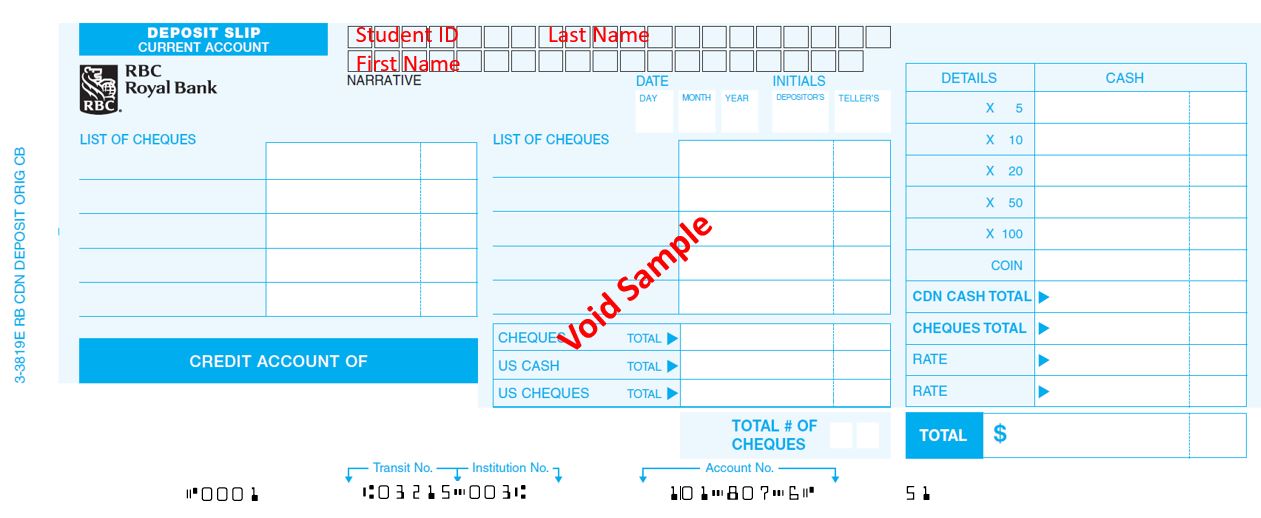
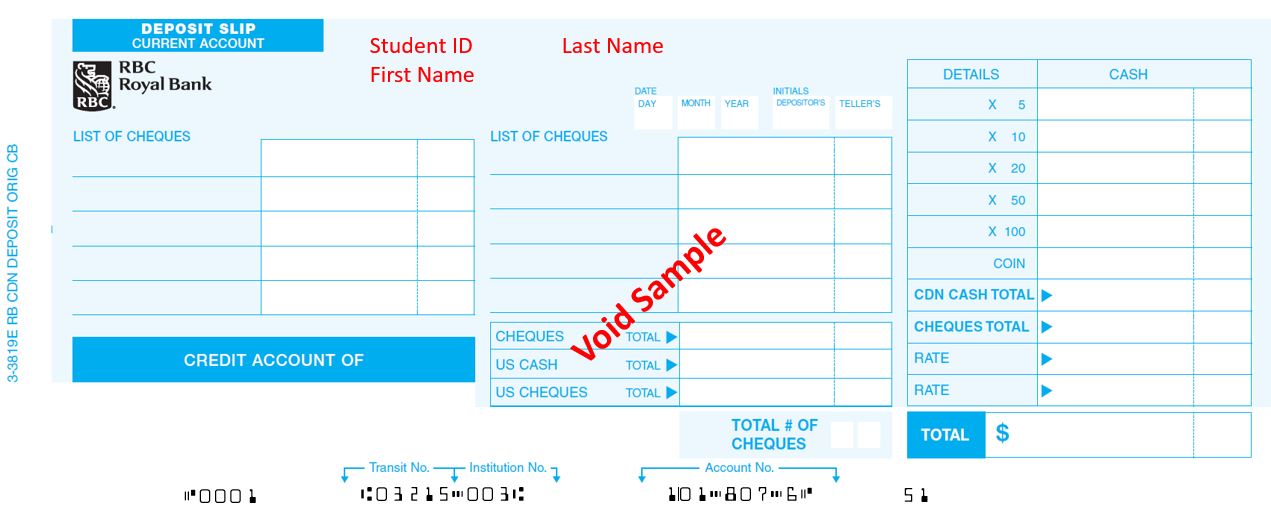
- Pick up an RBC Deposit slip at the Enrolment Services Advising Centre or at the RBC branch.
- Fill out your Student ID, followed by your Last Name and First Name in the “Narrative box” space provided at the top of the deposit slip. If you don’t have a “Narrative box”, write your details in the empty space on the top left as shown in the second screenshot.
- All student tuition cheques should be deposited into RBC Tuition Account #18076.
Tuition waivers are employment benefits available to UBC staff and faculty only. Learn about tuition waivers, eligibility requirements, and how to submit them to UBC.
Once your tuition waiver is approved by UBC Benefits, the waiver information will be updated in Workday.
The waivers do not cover student fees. Make sure you pay for your student fees in Workday. Learn how to view your tuition amount and payments.
If you have any questions, contact the ISC Helpdesk.
UBC does not accept deposits from most private lenders or unauthorized third-party service providers for the payment of tuition and/or student fees unless specifically listed as an exception below.
Transactions from private lenders will be rejected and students will be responsible for any fees incurred as a result of the payment or return of funds. If you have unpaid tuition and fees because of rejected transactions, you may be put on financial hold and charged an interest penalty.
Exceptions:
- US students can apply for private loans.
- UBC has a working agreement with Windmill Microlending and eligible students can connect directly with Windmill Microlending for more information.
- Students or applicants pursuing specific full-time Sauder School of Business graduate programs (Master of Business Administration, Master of Management, and Master of Business Analytics) may be eligible for loans from Prodigy Finance and should contact Sauder directly.
Scholarships
If you are a UBC scholarship recipient, the scholarship amount will be applied to your student account against any fees owed after you’ve accepted the award in Workday. Awards that have not been accepted will not be disbursed.
For scholarships paid in installments, funds will be credited to your tuition account on the date specified in the award legal agreement.
If your award amount is less than the total amount you owe, you’re required to pay the difference by the fee deadline to avoid late charges. If your award amount exceeds your tuition you must pay for the term, please set up your direct deposit before accepting the award to receive the balance directly.
Scholarships cannot be applied towards acceptance or registration deposits.
Follow the instructions to redeem BC Provincial scholarships, such as:
- BC Achievement
- District/Authority
- BC Excellence
- Pathway to Teacher Education
- Graduation Program Examination
Online verification
Submit the following documents through the Scholarship Redemption online form:
- Provincial Scholarship Voucher
Write your Social Insurance Number (SIN) and email address on the voucher. Check that your mailing address is correct. If it isn’t, provide your current address. - Verification or Proof of Enrolment
Download your Confirmation of Enrolment Letter in Workday. - Proof of Tuition Fee Payment
Download your proof of tuition payment, also known as your Account Statement, in Workday.
In-person option
- Gather your Provincial Scholarship Voucher
Write your Social Insurance Number (SIN) and email address on the voucher. Check that your mailing address is correct. If it isn’t, provide your current address. - Verify your document
Have your Provincial Scholarship Voucher stamped and signed at Enrolment Services Advising. - Submit your verified voucher
Scan or take a photo of your verified voucher and submit it through the Scholarship Redemption online form.
Mailing cheques to Enrolment Services
Undergraduate students who have received an external award should ask the granting agency or organization to send the cheque directly to Enrolment Services for processing with the subject line “Attention: External Awards Processing”.
In some cases, the granting agency or organization may require supporting documentation from the student before the cheque can be released.
If you’ve received the cheque directly from the organization, include your student number and Confirmation of Enrolment letter in your mail with the cheque to Enrolment Services. Allow at least 4 weeks for processing.
Bringing your external award cheque and payment slip to Enrolment Services
Make sure your cheque is correctly filled out, and that your student number is written on the front of the cheque on the memo line. Bring your cheque and payment slip to Enrolment Services Advising at Brock Hall.
Payments made by external award cheque at Enrolment Services Advising in Brock Hall will take at least 4 weeks to appear on your tuition account.
Sponsorship Billing
Some UBC students have a sponsor who pays a portion of their UBC fees. Sponsors can be an Indigenous community, employer, or government agency. When UBC sends a bill for fees to sponsors, this is called “third-party billing”.
Learn more about sponsorship billing and how the application or payment process works.
Late payment of fees
Your fees must be paid in full by the payment deadlines. Otherwise, you may be placed on a financial hold and charged a processing fee, as well as an interest penalty. Your financial hold will be removed when you pay the outstanding balance in full.
Learn about late payment of fees.
Tuition adjustments and refunds
If you are planning to drop or withdraw from a course, you may be eligible for a tuition refund or adjustment. To be eligible for a 100% refund of tuition, you must drop your classes by the course drop deadline.
If you have questions
For help with finances, registration, records, and more, please contact an Enrolment Services Advisor.